
Western Union Send Money Now
Western Union AppsFinance
4.7151.81K Reviews
- Version
- 16.4
- Installs
- 10.00M
- Age Rating
- Everyone
Screenshots
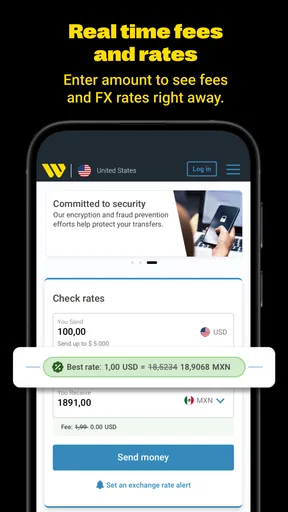
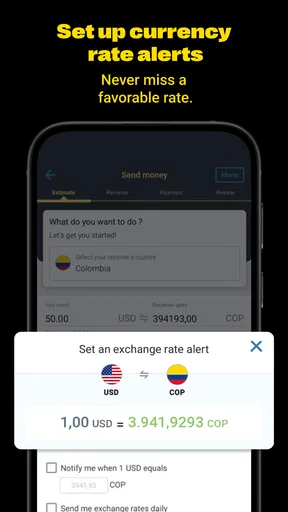
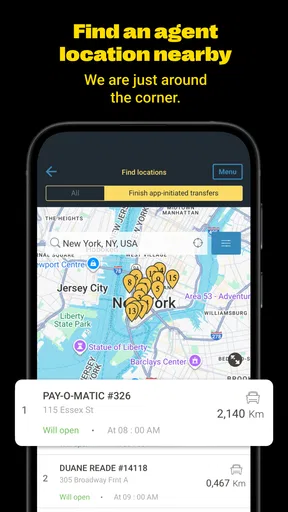
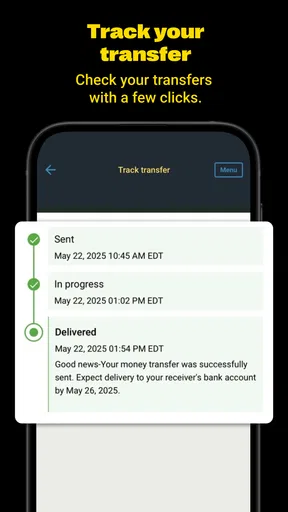
Our Review of Western Union Send Money Now
 Analysis by Appyee
Sending money from a phone sounds simple until the transfer becomes urgent, the connection turns unreliable, or the recipient needs the funds at a particular moment. I spent time looking at Western Union Send Money Now as a mobile finance app, and my impression is that it is most useful when you want to start and monitor an international remittance without sitting at a computer. The experience is built around a connected phone, so network quality is not a minor detail here; it affects how confidently you can enter information, review a transfer, and check what is happening next.
Western Union Send Money Now is a free app from Western Union Apps for everyone, and it has been available since Aug 18, 2011. Its purpose is focused rather than broad: it helps users send money and remittances worldwide through international transfers. That makes it more specialized than a general banking app, but also means its usefulness depends heavily on whether your particular transfer route, payment method, and recipient arrangement fit the service.
How connectivity shapes the transfer experience
I treat a connection as part of the transfer workflow, not just a way to open the app: a brief delay can affect when I review details, submit, or verify the outcome. This section looks at how I would choose the moment and network for a transfer, and why a pause to confirm the status is safer than rushing through a slow screen.
Why a stable connection matters at the important moments
The most important parts of a money transfer happen while the app is communicating with its service. Opening the app is one thing; signing in, entering recipient details, checking the transfer information, submitting the transaction, and viewing its progress are much more sensitive to interruptions. In my experience, this is the kind of app I would use when I have a dependable mobile or Wi-Fi connection, not while walking through a crowded station and trying to complete everything between two weak signal areas.
A slow connection can make a finance app feel more uncertain than a social or entertainment app. If a page takes time to load, I want to know whether the request is still being processed before I tap again. With a transfer, repeated taps or hurried corrections are not habits I would encourage. My practical advice is to pause after submitting an action, watch for the app to finish responding, and keep any confirmation or reference information available before closing the session.
This is also why I prefer preparing the essential details before opening the transfer screen. I would have the recipient’s information, the amount I intend to send, and my payment details ready rather than switching between several apps while the session is active. That reduces the chance of losing focus when the connection is slow and makes it easier to review the final details carefully.
A realistic mobile scenario
Imagine receiving a message from a family member who needs help while you are away from home. You have your phone, a reasonable signal, and a few minutes before boarding transport. The app can be valuable in that situation because it puts the remittance process close at hand instead of requiring a trip to a physical location or access to a desktop. I would still avoid rushing. I would move somewhere with a steadier connection, verify the recipient information character by character, and wait until the transfer status or confirmation is clearly displayed.
That scenario shows both the strength and the limitation. The phone makes the service accessible at a useful moment, but the convenience does not remove the need for concentration. A transfer is not just another quick mobile task. If the connection is unstable, the better decision may be to wait a few minutes rather than repeatedly attempting the same action.
Using it in different mobile contexts
The app makes the most sense for people who regularly manage remittances from a phone. A parent supporting relatives abroad, a worker sending money home, or someone handling an occasional international payment can benefit from having the process in a familiar mobile environment. I also see value for users who do not want to depend on a computer every time they need to check a transfer.
On the other hand, I would not choose it as my first option for a person who dislikes entering financial information on a small screen. Recipient names and transfer details deserve careful checking, and a phone can encourage hurried thumb typing. A larger screen may be more comfortable for reviewing several fields, especially when the sender is unfamiliar with international remittances.
The app is also less appealing when your main need is everyday spending, budgeting, bill management, or a complete current-account replacement. Its identity is international money transfer, not an all-purpose personal finance dashboard. Someone who only wants to move money between their own accounts may find a conventional banking app more direct. Someone comparing remittance services should look beyond the app interface and consider the route, payment method, delivery arrangement, and total cost for the specific transaction.
What I would prepare before starting
I found that the smoothest mobile workflow begins before the app is opened. I would confirm the recipient’s details through a trusted channel, decide exactly how much the recipient should receive, and make sure I understand whether the chosen delivery method suits them. This is more than organizational advice: it reduces the amount of time spent exposed to a weak connection and limits the temptation to make decisions while a page is loading.
I would also avoid starting a transfer when the phone battery is nearly empty or when I know I am about to lose service. The app is dependent on communication with the service, so a dead battery or a disappearing signal can leave the user unsure about what completed. A short preparation routine is one of the most useful habits I can recommend for this particular app.
When something goes wrong
The hardest moment is not necessarily a visible error. It can be a screen that stops responding just after you have submitted information. In that situation, I would not immediately repeat the transfer. First, I would wait, check whether the app returns a status or confirmation, and look for any transaction record that has already appeared. Only after establishing that the original attempt did not go through would I consider trying again.
This cautious approach matters because connectivity problems can blur the difference between “the request failed” and “the response has not arrived yet.” A user who taps repeatedly may create confusion for themselves, even if the service ultimately handles the requests correctly. I would record the time of the attempt and keep the recipient’s details nearby, which makes later support conversations easier if they become necessary.
If the app closes unexpectedly, I would reopen it only after the connection is stable and check the transfer history or current status before entering anything again. I would treat an unexplained interruption as a reason to verify, not as an invitation to start from the beginning. This is one of the less obvious lessons of using a connected finance app: recovery is often about gathering evidence first.
Checking details after reconnecting
Suppose the connection disappears while you are reviewing the transfer. I would reconnect to a trusted network, reopen the app, and inspect the account activity before editing or resubmitting. If the app shows a completed or pending state, that is more useful than relying on memory. If the screen simply returns to an earlier step, I would still avoid assuming that nothing happened until I had checked the available transaction information.
I would never ask the recipient to act on a transfer based only on my intention to send it. The useful confirmation is the one shown by the service, not a screenshot of a form that was never submitted. This distinction is especially important when the recipient is waiting for money urgently and may make plans around an uncertain arrival.
Keeping mobile data under control
Money transfers are not usually the kind of activity I would perform casually on mobile data. The amount of data used by a single session is less important to me than the risk of losing the connection at a critical point. I would use a reliable Wi-Fi network when available, but only one I trust for financial activity. A public network may be convenient, yet convenience should not outweigh basic caution when signing in or entering payment information.
For people with limited mobile data, the practical strategy is to plan the session. Avoid switching repeatedly between the app and media-heavy apps, download or open nothing unnecessary, and complete the transfer when the signal is strong. I would also keep the app updated through a suitable connection rather than waiting until an urgent remittance is needed. The current version is 16.4, and the app supports devices running Android 8.0 or later, so older phones should be checked before relying on it.
I would not interpret a successful connection as proof that every part of the transfer is complete. Network access lets the app communicate, but the sender still needs to read the displayed details and understand the status. A strong signal can deliver information quickly; it cannot replace careful review. That is why I see connectivity as an enabler of the workflow, not a guarantee of a smooth outcome.
How it compares with familiar alternatives
The usual alternatives fall into a few groups. A traditional bank app may be better for domestic payments or moving money between accounts already connected to the same institution. A physical remittance location may suit someone who prefers face-to-face help or does not want to manage the transaction on a phone. Other digital transfer services may be more attractive for a particular currency route, delivery option, or fee structure.
Western Union’s app has a clear advantage for users who already think of Western Union as their remittance provider and want mobile access to that process. It is also a reasonable choice when the recipient’s situation aligns with the service’s available international transfer arrangements. But I would not select it solely because the app is free to install. The real comparison belongs at the transaction level: check the amount the recipient receives, the available delivery choices, the payment route, and the expected timing before committing.
That trade-off is easy to miss. A polished mobile workflow can save time, but the cheapest or fastest option can change depending on where the money is going and how it will be received. I would compare the final result rather than assuming that a familiar brand automatically offers the best value for every corridor.
Who is likely to appreciate it
The app is a good fit for someone who sends international remittances and wants to manage the process from a phone. It is especially practical for users who value mobility, already have the necessary recipient information, and can complete financial tasks on a dependable connection. The broad adoption is reflected in its audience: it has passed ten million installs, with an average rating of 4.7 from around 348 thousand ratings. Those figures suggest that the mobile approach works well for many people, though they do not remove the need to judge whether it fits your own transfer route.
I would recommend it cautiously to first-time senders rather than telling them to rush in. The app can make access easier, but a newcomer should still understand the recipient details, delivery method, and final transfer information before confirming. If a person wants personal assistance at every stage, a physical location or a bank representative may feel more comfortable.
I would skip it when the phone is too old for the supported system, when connectivity is consistently unreliable, or when the user’s main goal is ordinary banking rather than international remittance. I would also look elsewhere if another service clearly offers a more suitable route for the recipient’s location and needs. Convenience is valuable, but it should not be confused with universal suitability.
My connectivity verdict
After considering the app as a real mobile finance tool, I see its strongest quality in the way it brings international remittance management into situations where a computer or physical branch is inconvenient. That matters when a transfer is needed during travel, outside normal routines, or while supporting family from a distance. The phone is the app’s advantage, but it also creates its central responsibility: the user must manage the network conditions and avoid treating a financial transaction like a disposable mobile task.
Western Union Apps has built a focused finance app rather than an overloaded money-management suite. It is free, rated for everyone, and supported on Android devices from version 8.0 onward. The service has been established for many years, and the large number of users and reviews gives it a substantial track record as a mobile remittance option. I would still judge each transfer individually, because the best choice depends on the recipient and the route.
My recommendation is simple: use it when you want Western Union’s international transfer service in a mobile format, have a stable connection, and are prepared to verify every important detail. Keep a recovery plan for interruptions, avoid repeated submissions, and compare the actual transfer outcome with alternatives when cost or delivery speed matters most. The app is convenient, but careful connectivity habits are part of using it well.
Verdict
Strengths of Western Union Send Money Now
- Send money to bank accounts, cards, or cash-pickup locations worldwide.
- Transfer tracking helps you monitor the status of each transaction.
- Large global agent network supports convenient cash pickup in many countries.
- Multiple payment methods may be available, including cards and bank accounts.
- Recipient details and past transfers can be saved for faster repeat payments.
Limitations of Western Union Send Money Now
- Exchange rates and fees can vary significantly by destination and payment method.
- Cash pickup may require valid identification and matching recipient information.
- Delivery times are not always instant, especially for bank deposits.
- Some features and transfer limits depend on your location and account verification.
- Customer support experiences may vary during delayed or disputed transfers.
Similar Picks in This Category
View All
Google Wallet
Google LLC4.3

Airtel: Recharge, Bank & Loans
Airtel4.0

PayPal - Pay, Send, Save
PayPal Mobile4.2

DANA Indonesia Digital Wallet
PT Espay Debit Indonesia Koe4.5

Binance: Buy Bitcoin & Crypto
Binance Inc.4.8

Cash App
Block, Inc.4.7
Frequently Asked Questions
What is Western Union Send Money Now, and how does it work?
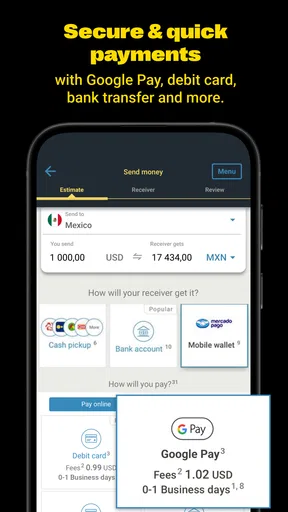
Western Union Send Money Now is a mobile service for sending money to recipients in other countries or locations. After creating an account, you can enter the recipient’s details, choose a delivery method, review the exchange rate and fees, and pay through an available option. The recipient may receive funds in a bank account, mobile wallet, or for cash pickup, depending on the destination.
How much does it cost to send money with Western Union Send Money Now?
The total cost usually includes a transfer fee and the exchange-rate margin applied when converting currencies. Fees can vary according to the sending country, destination, amount, payment method, delivery option, and transfer speed. Before confirming a transaction, the app displays the expected fee, exchange rate, and recipient amount, so it is worth comparing the final total before sending.
How long does a Western Union transfer take to arrive?
Delivery time depends on the selected service and the recipient’s location. Cash-pickup transfers may be available within minutes, while bank deposits and mobile-wallet transfers can take longer because of banking hours, local regulations, weekends, or verification procedures. The app normally provides an estimated arrival time, but this should be treated as an estimate rather than an absolute guarantee.
What information is required to send money through the app?
You generally need to register with personal information and provide valid identification when requested. For the transfer, the recipient’s legal name must match their identification documents, along with destination details such as a phone number, bank account, or mobile-wallet information. Requirements differ by country and transaction type, so carefully check every detail before submitting the payment.
Is Western Union Send Money Now safe, and can a transfer be canceled?
Western Union uses account security measures and transaction tracking tools, but users should still protect passwords, verification codes, and payment information. Never send money to someone you do not know or to satisfy suspicious demands. Cancellation may be possible if the transfer has not been collected or deposited, but eligibility, refunds, and timing depend on the transaction status and local rules.
